
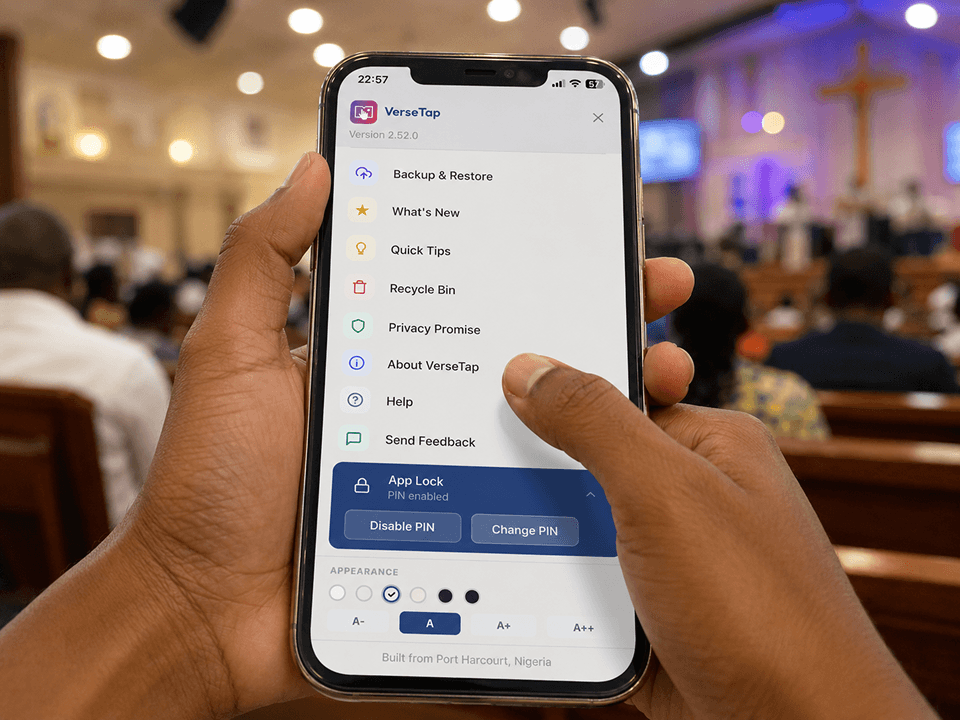

The VerseTap sermon notes app is now on iOS. iPhone and iPad users can download it free from the App Store today, joining over 1,000 users across 40+ countries already using VerseTap on Android and the web.
This post covers what the app does, what is coming next, and why iOS availability changes the picture for pastors, Bible teachers, and church workers who have been waiting.
Table of Contents
The Problem That Started All of This
Every Bible teacher I have spoken to has some version of the same story.
You preach a message on fear. Someone asks you six months later for the scripture you referenced about God’s response to Elijah under the juniper tree. You know you have it somewhere. Fifteen minutes later, you are still looking.
Or you are at a conference with poor internet and you need to look up 2 Chronicles 7:14 while someone else is speaking. The Bible app loads halfway, the connection drops, and you end up asking the person next to you.
Or you have ten years of sermon notes scattered across different apps, different phones, and different formats, none of it searchable from one place.
These are not edge cases. They are the daily friction of ministry work. The VerseTap sermon notes app was built specifically to remove that friction, and it is now available on iPhone.
What the VerseTap Sermon Notes App Does on iOS
Before this becomes a launch announcement that forgets to explain the product, here is what VerseTap actually is.
It is a writing-first sermon notes app with an offline Bible built in.
When you type a scripture reference in your notes, such as John 3:16 or Romans 8:28-30, VerseTap detects it automatically and pulls the full passage from a Bible stored entirely on your device. No lookup button. No copy-paste from a separate app. The passage appears inline as you write.
The offline Bible ships with four public domain translations: KJV, ASV, WEB, and YLT. All four work without internet. For a deeper look at why offline access matters for ministry, Biblegateway’s research on scripture engagement consistently shows that friction in accessing the text directly reduces study depth. VerseTap removes that friction at the source.
Your notes are stored locally on your phone and backed up to your personal Google Drive when you choose. VerseTap’s servers never receive your note content. This is not a privacy policy to read carefully and hope is accurate. It is how the system is built.
Features available on day one for iOS users:
- Automatic scripture detection. Type any reference while writing, and the passage appears from the offline Bible instantly.
- Four offline translations. KJV, ASV, WEB, and YLT, all embedded, all available without a data connection.
- AI-powered verse lookup. For partial references or passage descriptions, the AI fills in the gap.
- Full note organization. Titles, tags, and series grouping. Search across everything you have ever written.
- Recycle Bin. Deleted notes held for 30 days before permanent removal.
- Six themes and four font sizes. Read your notes the way that suits you.
- PIN App Lock. For notes you do not want anyone else opening.
- Cross-platform archive. The same notes accessible on Android, iPhone, and the web at versetap.app.
Everything above is free, with no subscription and no ads.
Why iOS Took This Long (And Why That’s a Good Thing)
VerseTap launched on Android first. That was a deliberate choice, not a constraint.
Android allowed faster iteration and real-world testing with users before navigating Apple’s stricter build environment. By the time we submitted to the App Store, we had over 1,000 downloads across 40+ countries. We understood which features people return to, where friction lives, and what the app actually needed to be on iOS before building it there.
The iOS version is not a direct port. The Drive OAuth flow was rebuilt for WKWebView’s stricter security model. The formatting toolbar was rearchitected to handle iOS focus management correctly. The result is a version that has been tested against real Apple constraints, not just approved by their review team.
App Store ID: 6776201273.
What’s Coming Next: Three Features in the Pipeline
The iOS launch is not the ceiling of what VerseTap is building. Here are the three features currently in active development.
Prayer and Study Finder
You type a life situation or spiritual theme into VerseTap. Something like “fear,” “financial crisis,” “grief,” or “safe delivery.” The app returns 8 to 10 contextually relevant scripture passages, each classified by type: Promises, Principles, Prophecies, and Stories.
The classification matters because different scriptures serve different purposes in prayer and study. A Promise anchors faith. A Principle gives direction for action. A Prophecy declares God’s purposes. A Story offers a narrative that shows someone walked a similar road before you.
For a Bible teacher preparing a counseling session with limited time, this feature reduces 40 minutes of searching to 2 minutes of finding.
Greek and Hebrew Word Definitions
The original languages carry meaning that English translations compress.
When Paul writes that love “suffereth long” in 1 Corinthians 13, the Greek word is makrothumia, carrying a specific sense of patient endurance under provocation. That nuance changes how you teach the text. VerseTap will make that one tap away from any passage you are studying, without requiring a seminary library or a separate app.
Automatic Google Drive Sync
Currently, backing up your notes to Google Drive requires a manual action. The next version will handle this automatically on a schedule you set: daily, weekly, or monthly. The app backs up silently in the background. You never lose work because you forgot to tap a button.
For users building a multi-year sermon archive, this makes data loss genuinely impossible.
VerseTap vs. Other Sermon Note Apps on iPhone
This is the honest section.
VerseTap vs. Sermon Keeper
Sermon Keeper is an iOS-focused app built around audio recording. You record a sermon or Bible study, and the app transcribes it with AI, adding timestamps and verse autocomplete. It is well-built for what it does.
The difference is philosophy. Sermon Keeper is audio-first and recording-focused. VerseTap is writing-first and study-focused. Sermon Keeper captures what was said. VerseTap builds an archive of what you understood, connected to the actual scripture text.
If you want to record and transcribe, Sermon Keeper is worth evaluating. If you want to write, study, organize, and search years of sermon notes with scripture woven in, VerseTap is built for that purpose. Sermon Keeper is also currently iOS-only. VerseTap runs on Android, iPhone, and the web from one account.
VerseTap vs. Evernote or Notion
These are excellent general-purpose tools. But they do not detect scripture references as you type. They carry no offline Bible. They have no concept of a sermon series or pastoral study workflow. And they store your notes on their own servers, not in your personal Drive.
Using Evernote for sermon notes is like using a word processor to manage a library. It holds documents, but it has no idea what they are.
VerseTap’s core advantages as a sermon notes app on iOS:
- Offline-first architecture. The Bible works without internet. No other sermon-specific iOS app ships a fully embedded Bible with four translations.
- Privacy by design. Your notes never leave your phone unless you send them to your own Google Drive. This is architectural, not a setting.
- Cross-platform. One account and one archive, accessible on every device you carry to church.
- Free. No subscription. No ads. No freemium limits on core features.
How to Get Started on Your iPhone Today
Getting started with the VerseTap sermon notes app on iOS takes about four minutes.
Step 1: Download VerseTap from the App Store. Search “VerseTap” or visit versetap.ng for the direct link.
Step 2: Go through the onboarding. It shows you how scripture detection works and walks you through creating your first note.
Step 3: Create a note and type any scripture reference. Watch the passage appear from the offline Bible.
Step 4: Connect your Google Drive whenever you are ready to back up. This is optional and can happen at any time, with no pressure.
If you prefer the web version without an app install, go to versetap.app. It runs as a PWA and works on any browser, on any device.
Frequently Asked Questions
Does the VerseTap sermon notes app work without internet on iPhone?
Yes. The Bible is embedded across four translations: KJV, ASV, WEB, and YLT. All four work completely offline. Your notes are also stored locally. Internet is only needed for Google Drive backup or AI fallback on edge-case scripture references.
Is VerseTap free on iPhone?
Yes. VerseTap is free on iOS, Android, and the web. No subscription, no in-app purchase, and no ads. This remains true through 2026.
Where are my notes stored?
Your notes are stored on your device. When you connect Google Drive and choose to back up, they go directly to your personal Google Drive account. VerseTap’s servers never receive your note content.
Can I use VerseTap across Android and iPhone?
Yes. Connect the same Google Drive account on both devices and restore from backup on the second device. Your full archive transfers across platforms.
What Bible translations are available?
KJV, ASV, WEB, and YLT. All four are public domain and fully offline.
When is the Prayer and Study Finder coming?
It is currently in active development and is the top priority feature after the iOS launch. No public release date yet.
Is VerseTap available on desktop?
Yes. The PWA version at versetap.app runs on any desktop or laptop browser with full note sync via Google Drive.
VerseTap is now on Android, iPhone, and the web. Over 1,000 users across 40+ countries are already using it for sermon notes, Bible study, and scripture reference.
If you are a Bible teacher, church administrator, or believer who takes your study seriously, this is the tool we built for you.
Tap the Verse. Feel the Life.
Download free at versetap.ng or search “VerseTap” on the App Store and Google Play.
By Simeon Taiwo Oluwafimijoba, Founder of VerseTap and Clarylife Global. Simeon is a church administrator, Bible teacher, and brand strategist based in Port Harcourt, Nigeria. He holds certifications in Brand Management from the University of London and AI Product Management from Duke University. VerseTap is his attempt to build the tool he needed and could not find.