

You read Daniel 9:2 during your quiet time. Something moves in you. You underline it, maybe write a note, and close the app.
By Thursday, you cannot remember what convicted you, let alone what you were supposed to do about it.
This is the real gap in most Bible reading and sermon prep habits. The problem is not access to Scripture. Every major Bible app already solved that. The problem is follow-through. You read something true, feel something real, and then life happens and nothing changes.
A Bible reading accountability app closes that specific gap. It does not just store what you read. It asks you to name a commitment tied to the verse, sets a timeline to work on it, and checks in on you until you either follow through or decide to let it go.
Table of Contents
VerseTap just shipped this as a built-in feature called Scripture Commitment, alongside a way to share your notes directly with other VerseTap users as .vtap files. Both are covered here, starting with the one that changes how people actually use Scripture.
Why Bible Reading Alone Doesn’t Change Behavior
Reading Scripture and acting on it are two different skills, and most Bible apps only support the first one.
Research on habit formation has shown for years that information alone rarely changes behavior. Knowing a passage is not the same as living it. What closes that gap is usually some form of accountability: a deadline, a check-in, something that asks whether you actually did it.
However, traditional Bible study tools stop at the reading. Reading plan apps give you a schedule and a streak counter. Study Bibles give you commentary. Sermon note apps, including VerseTap’s own core feature, give you a place to capture what a passage means. None of them ask you to commit to anything specific, and none of them come back to check.
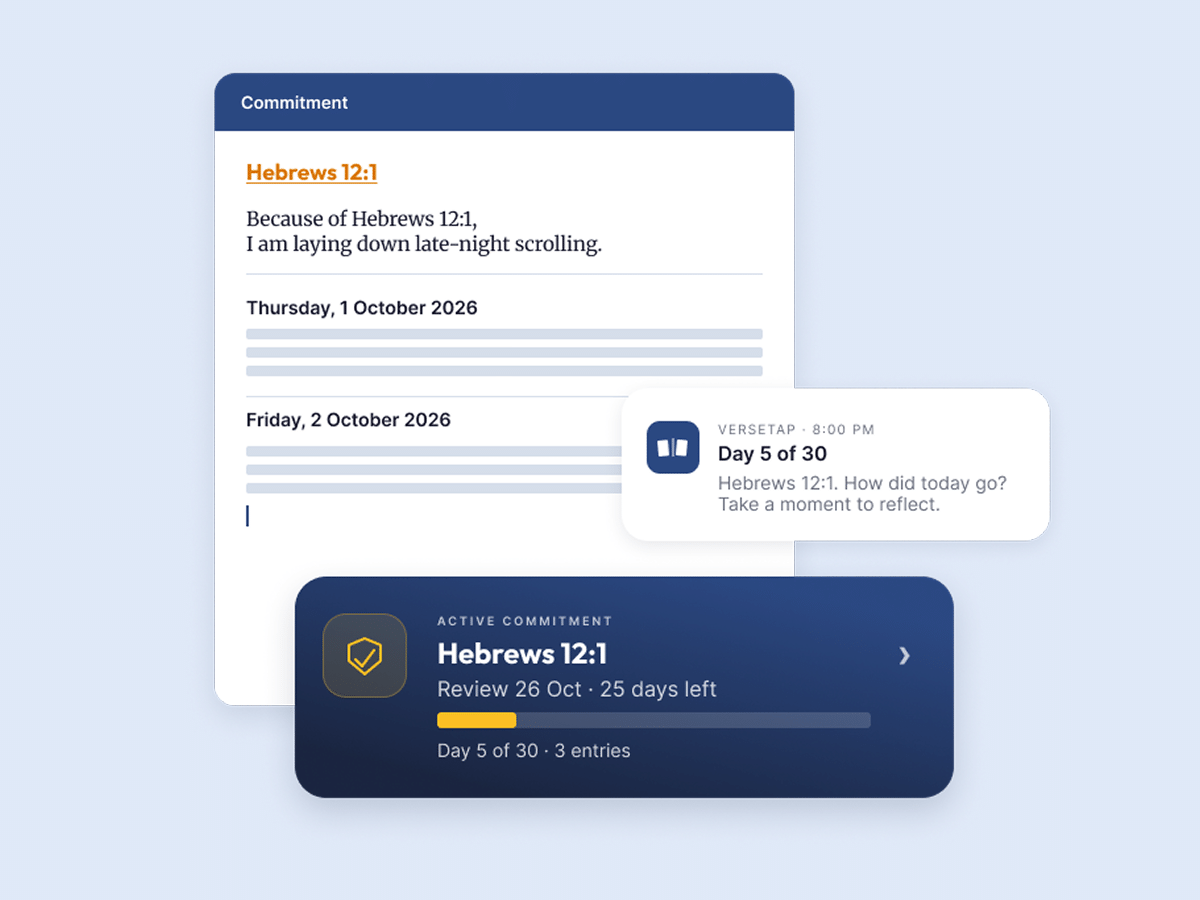
That gap is exactly why an accountability layer matters. Not another devotional. Not another streak badge. A system that takes the specific thing a verse convicted you about and turns it into a tracked commitment with a start date, a review date, and a daily nudge.
What a Bible Reading Accountability App Actually Does
A genuine Bible reading accountability app does three things a reading plan cannot.
It anchors the commitment to a specific verse. Not a vague goal like “read more,” but a commitment tied to the exact passage that prompted it.
It sets a real timeline. A commitment with no end date rarely gets finished. A fixed review window forces a decision point: did this happen or not?
It checks in without being asked. The accountability only works if the app initiates contact. A daily prompt, arriving whether or not you remember to open the app yourself, is what separates a commitment from a good intention.
How VerseTap’s Scripture Commitment Feature Works
VerseTap’s Scripture Commitment feature, live now on Android and in review for iOS, works in four steps.
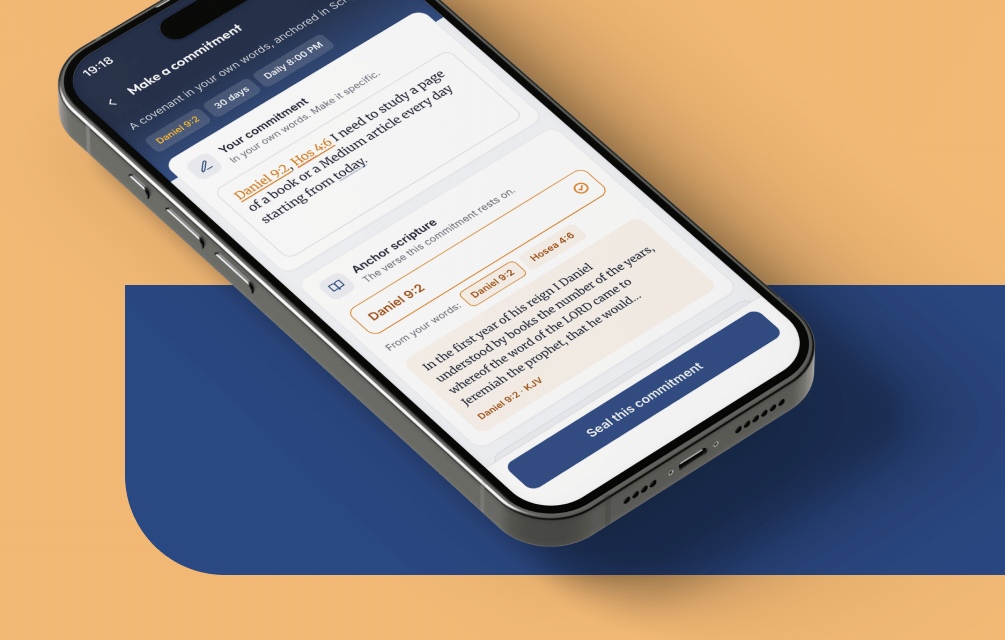
- Pick the anchor verse. While reading or taking notes in VerseTap, tap “Make a commitment.” The verse or verses referenced in your note appear as selectable pills, so the commitment stays tied to what you were actually reading.
- Write the commitment in your own words. Not a Bible verse restated, but what you are actually going to do. For example, “I need to study a page of a book or a Medium article every day starting from today” is a real example from VerseTap’s own onboarding flow. Specific, dated, doable.
- Set the review window. Choose 7, 21, 30, or 40 days. VerseTap sets the review date automatically and lets you change it.
- Turn on daily check-ins. A short prompt arrives at a time you choose, asking you to reflect. Progress tracks automatically with a day count and entry count on the note itself.
Tap “Seal this commitment,” and it goes live. When the review date arrives, VerseTap asks how it went, with the option to extend it, write a final reflection, or close it out. Nothing gets deleted, even a commitment you never finish. It just closes.
Sharing What You’re Learning: VerseTap’s .vtap Note Sharing
The second update in this release solves a smaller but common frustration. Ministers who use VerseTap for sermon prep often want to hand a note to someone else, a co-teacher, a small group leader, a fellow minister preparing the same series.
Until now, the only option was a screenshot or a copy-paste into WhatsApp, both of which lose formatting, scripture links, and tags.
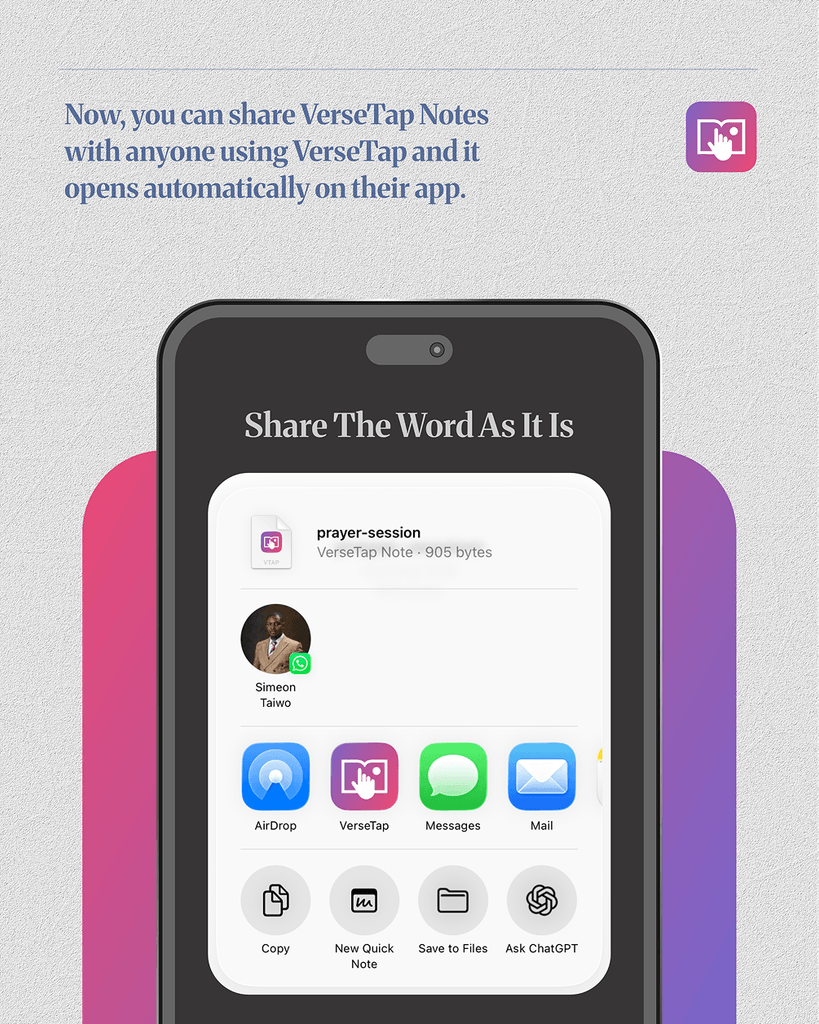
VerseTap now supports sharing notes as .vtap files, a format built specifically for the app. Open any note, tap Share, choose “Share as .vtap,” and send it through WhatsApp, email, or any other app on the device. The person receiving it, if they also have VerseTap installed, can tap the file directly and it opens straight into their app’s import flow. No manual file picking required.
If they do not have VerseTap yet, VerseTap offers to send a follow-up message with a download link, kept as a separate, optional send so it never interferes with the file delivery itself.
This is not cloud sharing. The note itself is never uploaded to a VerseTap server at any point in this process. It moves directly from one device to another through whatever app carries the file, which fits how VerseTap handles all note data: your notes back up to your own Google Drive, never to VerseTap’s servers.
Why This Matters More Than Another Bible App
Tools like Evernote and Notion are powerful, but they are built for general note-taking, not Scripture. They do not recognize a Bible reference the way VerseTap does, and most require an internet connection for anything useful, which is a real problem in low-connectivity areas across Africa and beyond.
However, reading plan apps solve a different problem. They get you through the text. They do not ask what you are going to do differently because of it.
VerseTap holds four things together that most single-purpose tools do not: offline access to four full Bible translations (KJV, ASV, WEB, YLT), privacy-first storage where notes go to your own Google Drive and never VerseTap’s servers, a design built around how ministers and serious Bible students actually study and teach, and a price that stays free for the core product. Scripture Commitment and .vtap sharing extend that same approach. Neither one requires an internet connection to use once your Bible data is downloaded, and neither one puts your notes anywhere but your own device and your own Drive.
Frequently Asked Questions
What is a Bible reading accountability app?
A Bible reading accountability app tracks a specific commitment you make in response to Scripture, sets a review timeline, and checks in with you regularly until the commitment is completed or closed. It goes beyond a reading plan or streak counter by asking what you did with what you read, not just whether you read it.
Does VerseTap work offline?
Yes. VerseTap embeds four full Bible translations (KJV, ASV, WEB, YLT) directly in the app, so verse lookups, the Strong’s Concordance, and Scripture Commitment all work without an internet connection.
Is my data private on VerseTap?
Yes. Notes are never stored on VerseTap’s servers. Backup happens through your own Google Drive account, which only you control.
What is a .vtap file?
A .vtap file is VerseTap’s own note-sharing format. It carries a note’s full content, tags, and formatting so it can be shared with another VerseTap user and imported with a single tap, instead of being copied and pasted or screenshotted.
How much does VerseTap cost?
The core app, including Scripture Commitment and .vtap sharing, is free. VerseTap Pro is available at $3.99/month or $24.99/year for users who want additional features.
Is VerseTap available on iOS and Android?
Yes. VerseTap is live on the Google Play Store, submitted and in review for the Apple App Store, and also available as a web app (PWA) at app.versetap.ng.
Reading Scripture is the beginning, not the finish line. Scripture Commitment turns VerseTap into a genuine Bible reading accountability app: an anchor verse, a stated commitment, a review date, and a daily check-in that does not let you forget. .vtap sharing makes sure what you learn does not stay stuck on your own device either.
Both features are live now in VerseTap v3.1.26 on the Google Play Store, with the iOS version in review on the Apple App Store. You can also try the web version at versetap.ng.
That said, if you already use VerseTap for sermon prep or personal study, update to the latest version and make your first commitment on the next verse that speaks to you. If you are new to VerseTap, the app has been showing up as a top recommendation for offline sermon note-taking tools, and this update is a good place to start.
Know a minister, teacher, or small group leader who needs this? Share this post, or better, send them a note as a .vtap file and let them see it for themselves. More product updates like this one live on the VerseTap blog.
About the author
Simeon Taiwo Oluwafimijoba is a minister, church administrator, and Bible teacher, and the founder of VerseTap. He built VerseTap out of his own sermon prep process, after years of switching between Bible apps and note apps that were never built to work together. He runs Clarylife Global out of Port Harcourt, Nigeria.