


On a Thursday afternoon in Port Harcourt, Nigeria, Simeon Taiwo Oluwafimijoba was sitting with a Samsung tablet, switching between YouVersion and his note app while preparing to teach. He kept toggling. Bible open, notes open, Bible open again. At some point he stopped and asked himself a question: “Why can’t this note app be smart enough that if I tap on Jeremiah, it pops up the passage?”
That question became VerseTap, an AI sermon notes app built specifically for ministers, Bible teachers, and serious Bible students. It is now used by 1,800+ people across 50+ countries. It was built in Port Harcourt by a single founder, at Clarylife Global Limited, without a team or external funding.
The Problem That Started Everything
The friction Simeon encountered is not unique to Nigeria. Any minister who prepares sermons digitally knows the workflow: you are mid-thought, a scripture comes to mind, you flip to your Bible app, confirm the verse, flip back to your notes, and the thread of thought has gone cold. You write “Romans 8:28” in your notes as a placeholder and tell yourself you will look it up later. Sometimes later never comes before Sunday.
The deeper problem is architectural. Note apps were built for general content. They have no concept of a Bible reference. “John 3:16” is just a string of characters. The note app does not know it is a verse. It cannot surface the passage. It cannot link you to related scriptures. It cannot help you study.
So pastors, teachers, and church-goers keep running a two-app workflow that interrupts the study session every time a reference surfaces. Sermon notes end up full of half-finished references, interrupted thoughts, and passages never followed up.
The solution to this problem did not come from a Bible software company in the United States. It came from a minister in Nigeria who was tired of the interruption.
Building VerseTap From Port Harcourt
Simeon Taiwo Oluwafimijoba is a minister and church administrator. He also founded Clarylife Global, based in Port Harcourt, Nigeria. He holds certifications in Brand Management from the University of London and AI Product Management from Duke University. Before building VerseTap, he ran Clarylife Global as a systems automation company.
He built VerseTap himself using React, TypeScript, and Capacitor — a stack that lets a single codebase run as an Android app, an iOS app, and a Progressive Web App simultaneously. That choice was not accidental. He wanted one codebase, broad reach, and the ability to ship updates to all platforms at once without maintaining separate codebases.
Three decisions made at the beginning shaped everything that followed.
The first was offline-first architecture. Nigeria has unreliable internet in many ministry contexts. Churches in rural areas, ministers traveling, Bible study groups meeting without reliable data. VerseTap was built so that the entire Bible would live on the device. Not cached. Embedded. Available at zero bars.
The second was privacy-first design. Sermon notes carry pastoral insights, personal theology in progress, sometimes sensitive spiritual content. Simeon decided early that VerseTap would never store user notes on its own servers. Notes back up only to the user’s own Google Drive. This was a founding architectural commitment, not a product feature added later.
The third was scripture-aware workflows. The whole point of the app was that typing a Bible reference should surface the passage immediately, inside the note, without switching apps. That meant the Bible had to be built into the editor, not bolted on as a lookup tool.
The Timeline: From First Concept to 1,800+ Downloads in 50+ Countries
December 25, 2025: VerseTap launches on Android via Google Play and as a Progressive Web App at versetap.app. The core features are live: scripture auto-detection, rich text editing, Google Drive backup. Notes never touch VerseTap’s servers at launch or at any point since.
December 2025: First posts published at versetap.ng. The blog establishes the public record of product development from the start.
Early 2026: Scripture auto-detection, the rich text editor, Google Drive backup, and basic tagging are shipped and stabilized. The waterfall lookup system is established: check local cache, check offline Bible files, fall back to AI if needed.
v2.52.0 (early 2026): A decision is made to remove all copyrighted Bible translations (NIV, ESV, NKJV, NLT) and replace them entirely with public domain translations: ASV (1901), WEB, and YLT (1898), alongside KJV. The offline Bible now holds 155,494 total verses across four complete translations, all embedded in the app, no internet required. This was not a downgrade. It was a legal and philosophical alignment: the Bible belongs to everyone.
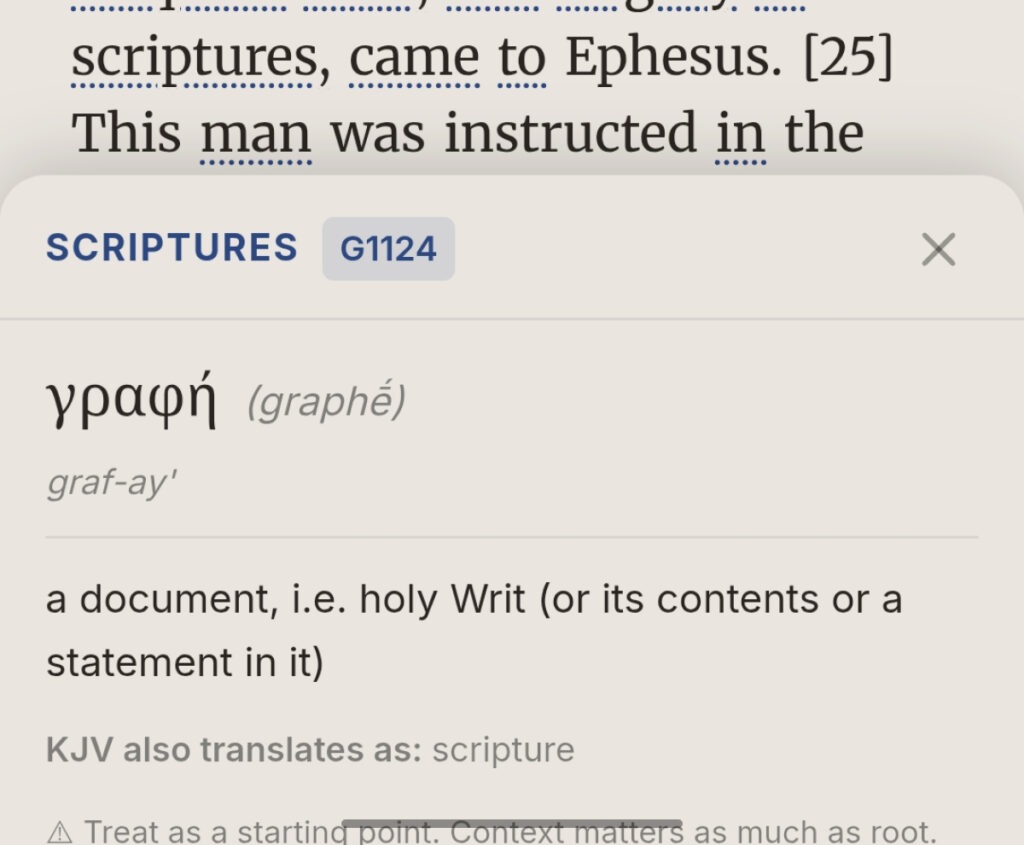
v2.54.0: Strong’s Concordance word study ships. 5,523 Greek entries and 8,674 Hebrew entries — 14,197 total — are embedded in the app alongside per-book KJV word maps. Tap any KJV word in a passage and the original language entry appears: the Greek or Hebrew term, its transliteration, pronunciation, definition, and how it is rendered across the KJV. Fully offline. No subscription required. At the time, no other sermon note app offered anything close to this at any price.
v2.64.0: The full offline Bible browser (BibleBrowser) ships. Ministers can now navigate the entire Bible by book and chapter inside the app, select verses, run verbatim searches, and return to their notes without ever leaving VerseTap.
v2.92.0: Scripture Counsel launches. Users type a life situation or theme — grief, fear, guidance, finances, safe delivery, marriage — and VerseTap returns 8 to 10 relevant KJV passages classified by the 4Ps framework: Principles, Prophecies, Promises, Stories. Eleven curated themes covering 119 hand-reviewed verses ship offline. An AI-powered fallback handles any theme not yet in the curated database.
May 2026: Technext publishes a founder spotlight, becoming the first major tech publication to cover VerseTap and the story behind it.
June 2026: VerseTap launches on the iOS App Store. The app is now live globally on Android, iOS, and web. Any device. Any platform. Same notes, same Bible, same privacy commitment.
v3.0.0: VerseTap Pro launches at $3.99/month or $24.99/year. Cross-device Pro recognition ships via RevenueCat’s Login API — purchase on one device, link your account by email on any other device and Pro follows you. The free tier remains permanently free for all core note-taking and Bible features. Pro unlocks unlimited AI Scripture Counsel, unlimited semantic Bible search, and push-on-save Drive backup.
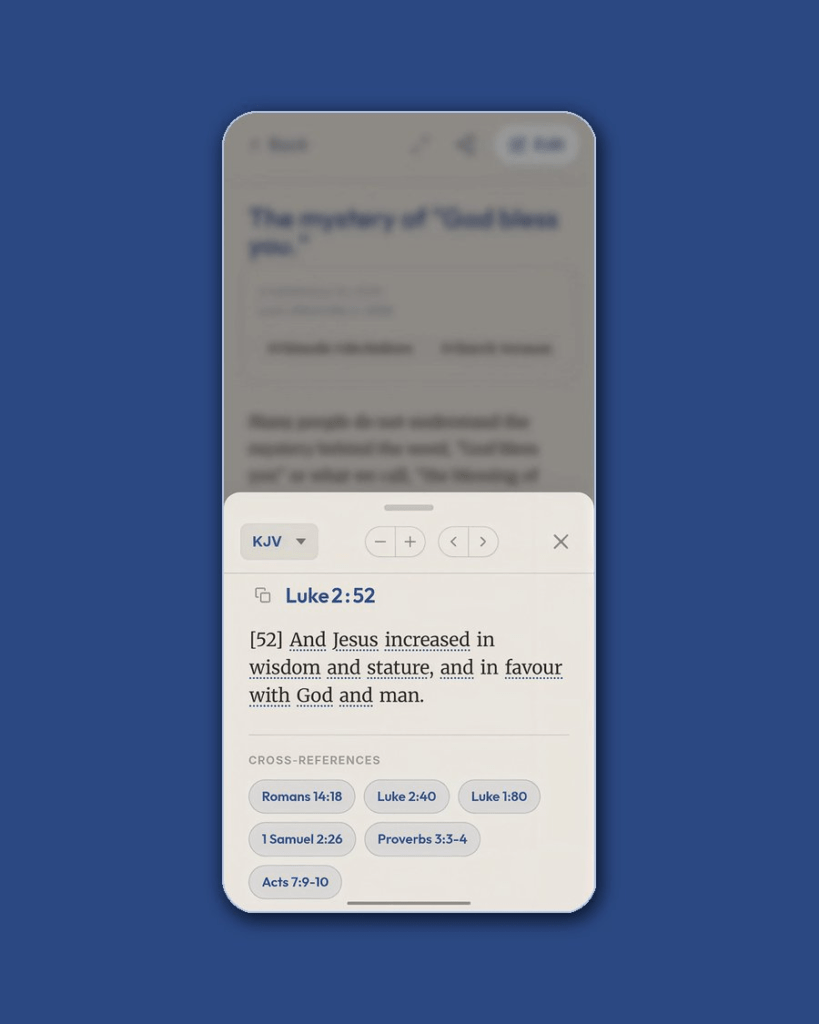
v3.1.2: The Treasury of Scripture Knowledge cross-references ship. OpenBible.info’s dataset of 341,286 cross-reference connections across all 66 Bible books is embedded in 66 JSON files, one per book, loaded on demand. Pull up any verse in VerseTap and tappable chips below the text navigate directly to related passages. Offline. Free. Push-on-save automatic Drive backup also ships for Pro users — four seconds after you stop typing, the note is on Drive.
v3.1.4: BibleBrowser verbatim search is overhauled with in-memory index scanning for faster results. AI semantic search results are cached for 90 days. Swipe-to-select verses and search result pre-populated notes ship.
August 2026: 1,800+ downloads across 50+ countries. Available on Android, iOS, and web at versetap.app.
What Makes VerseTap Different
There are other apps used for sermon notes. There are Bible apps. There are general note tools. VerseTap holds four things simultaneously that no other app in this category matches at its price point.
Offline-first. The entire Bible — 155,494 verses across KJV, ASV, WEB, and YLT — is embedded in the app. The Strong’s Concordance (14,197 entries) and the Treasury of Scripture Knowledge (341,286 cross-references) are embedded too. VerseTap works at zero bars. That matters in most of the world.
Privacy-first. Notes never touch VerseTap’s servers. This is not a toggle. It is the architecture. The only place user notes go is the user’s own Google Drive. No company database. No training data. No terms of service language about what can be done with your pastoral insights.
Scripture-aware. Type a reference and the passage surfaces inside the note. Tap a word in KJV and the Strong’s entry appears. Pull up a verse and cross-references appear below it. These are not features added around the edges of a generic note app. They are the core of how the app was designed from the Thursday afternoon question forward.
Affordable. The free tier is permanently free with all core features. VerseTap Pro is $24.99/year — compared to Edena at $60 to $416/year, Sermon Keeper at $64.99/year, and Evernote at $179.88/year. For ministers and church-goers who need a serious tool without an enterprise budget, the price point was always part of the design. See how VerseTap compares to other options in the full comparison of sermon note apps.
What’s Next for VerseTap
AI Tag Suggestions is in development — the app will begin suggesting sermon series tags and topic categories based on the content of a note, reducing the organizational overhead of a large library.
Church licensing is planned for 2027. The goal is to let a church administrator issue VerseTap Pro accounts to their entire ministry team under a single license, so the same scripture-aware note environment is available to everyone from the senior pastor to the Sunday school teacher.
Scripture study depth continues as the core development priority. The foundation — offline Bible, Strong’s Concordance, Treasury of Scripture Knowledge cross-references, Scripture Counsel — is built. The next layer is making these tools work together in ways that reduce the distance between a minister and the text they are studying.
The v3 release established the Pro tier and cross-device sync. The next milestone is making the study layer smarter, not the note layer bigger. Read more about VerseTap’s study tools in the offline concordance feature post.
Frequently Asked Questions
What is VerseTap?
VerseTap is an AI-powered sermon note-taking and Bible study app built in Nigeria by Simeon Taiwo Oluwafimijoba. It automatically detects scripture references in your notes and displays the full passage instantly, offline, without switching apps. Available on Android, iOS, and web at versetap.app.
When was VerseTap created?
VerseTap launched in late 2025 on Android and as a Progressive Web App. iOS launched in June 2026. The app reached v3.1.4 by August 2026 with major feature releases throughout the development period, including the Strong’s Concordance (v2.54.0), full Bible browser (v2.64.0), Scripture Counsel (v2.92.0), Pro tier (v3.0.0), and TSK cross-references (v3.1.2).
Is VerseTap the first AI sermon notes app from Nigeria?
VerseTap is the first Nigerian-built app focused specifically on AI-powered sermon note-taking with an embedded offline Bible. It launched on Android and web in late 2025 and has served ministers, Bible teachers, and serious Bible students continuously since then.
Does VerseTap work offline?
Yes. VerseTap embeds 155,494 verses across five complete Bible translations (KJV, WEB, BSB, ASV, YLT), 14,197 Strong’s Concordance entries (5,523 Greek, 8,674 Hebrew), and 341,286 Treasury of Scripture Knowledge cross-references. All core features work without internet.
How is VerseTap different from Pewbeam?
Pewbeam is a church presentation tool that projects Bible verses on screen during live sermons by listening to the pastor’s voice. VerseTap is a personal sermon note-taking and Bible study app for individual ministers and believers. Pewbeam processes audio on its servers. VerseTap never stores user notes on its servers. They serve different primary jobs and the distinction matters both functionally and from a privacy standpoint.